When you have nothing todo, set up DNS

보유한 기기들
기기중 `Monster` 노트북을 DNS 서버로 만들 계획이다.

DNS 설계도
다음의 그림과 같이 구성할 예정이며, DNS 프로그램으로는 BIND9 을 사용할 계획이다.

DNS 구성
DNS 서버(monster) 에 bind9 소프트웨어가 설치되어 있다 ( 우분투에 소프트웨어 쉽게 설치 방법은 추후 설명 )
DNS 서버의 기능
DB 처럼 `호스트명` 과 `IP 주소` 를 등록 및 관리하고 클라이어트 호스트에서 호스트명이나 `IP 주소`를 요청할 경우 그 상대되는 값을 전달해 준다.
따라서, 호스트명과 IP 주소를 관리하는 DB를 만들어 준다.
파일명은 `db.the.sys` 로 위 그림의 도메인 이름과 `db` 를 조합해 파일명을 만든다. 이 DB 파일은 `호스트명`을 받아 `IP 주소`를 출력해 주는 기능으로 사용한다.
* bind9 소프트 웨어는 `/etc/bind` 이 곳을 기본 디렉토리로 사용한다. 바꿀수는 있으나 바꿀지 않는게 좋다.
< 설정 파일 구성 전 꿀팁 >
꿀1) DNS 구성 시, 점검 툴이 2개 있다. `.conf` 점검하는 툴과 `zone, db` 파일 점검하는 툴. bind9 재기동 전 이 2개 툴을 이용해 설정에 오류가 없는지 점검한다.
# `conf` 설정정보 점검 툴
$ named-checkzond `파일명`		# named.conf.local 등

# `zone, db` 설정정보 점검 툴  # db.127 등
$ named-checkzone `도메인명` `zone 파일명`  # the.sys db.the.sys

# reverse name zone
$ named-checkzond `IP Zone` `zone 파일명`  # 110.10.in-addr.arpa db.10.110
꿀2) bind9 의 에러 및 로깅은 `/var/log/syslog` 파일에 쌓인다. dns 작동에 의심이 가는 경우 확인해 보는 것이 좋다.
$ tail -f /var/log/syslog

Aug 16 10:38:00 localhost named[19749]: all zones loaded
Aug 16 10:38:00 localhost named[19749]: running
Aug 16 10:38:00 localhost named[19749]: zone the.sys/IN: sending notifies (serial 3)
Aug 16 10:38:00 localhost systemd[1]: Started BIND Domain Name Server.
Aug 16 10:38:00 localhost named[19749]: managed-keys-zone: Key 20326 for zone . is now trusted (acceptance timer complete)
Aug 16 10:38:00 localhost named[19749]: resolver priming query complete: success
`db.the.sys` 파일을 열어 다음과 같이 작성한다.
; base zone file for the.sys
$TTL    2d          ; default TTL for zone
$ORIGIN the.sys.    ; base domain-name
@   IN  SOA monster.the.sys. admin.the.sys. (
                  3     ; Serial
             604800     ; Refresh
              86400     ; Retry
            2419200     ; Expire
             604800 )   ; Negative Cache TTL
;
; name server - NS records
    IN  NS  monster.the.sys.
    IN  NS  samkong.the.sys.
    IN  NS  zrr9.the.sys.
; name server - A records
monster IN  A   10.110.50.51
samkong IN  A   10.110.50.52
zrr9    IN  A   10.110.50.53
;
; A records for code-server
codemonster IN  A   10.110.50.51
codesamkong IN  A   10.110.50.52
codezrr9    IN  A   10.110.50.53
;
; A records for app services
addradm     IN  A   10.110.50.53
addrlaw     IN  A   10.110.50.53
country     IN  A   10.110.50.53
* SOA Record; Start of Authority : SOA 레코드에는 도메인에 대한 중요한 정보와 이 것을 책임지는 담당자 정보가 포함되어 있다.
다음은 `IP 주소` 를 받아 `호스트명`을 출력해주기 위한 기능(Reverse 기능)을 위한 DB 파일을 만든다. 파일명은 `db.10.110` 으로 명명 했는데, `10.110.x.x` 범위의 (IP 주소의 구성에 대한 설명은 추후 작성) 주소를 관리한다는 뜻으로 `db` 라는 의미와 조합해 만든다.
`db.10.110` 파일을 열어 다음과 같이 작성한다.
$TTL    604800
$ORIGIN 110.10.in-addr.arpa.
@       IN      SOA     monster.the.sys. admin.the.sys. (
                              3         ; Serial
                         604800         ; Refresh
                          86400         ; Retry
                        2419200         ; Expire
                         604800 )       ; Negative Cache TTL
;
; name servers - NS records
        IN      NS      monster.the.sys.
; PTR Records
51      IN PTR  monster.the.sys.
52      IN PTR  samkong.the.sys.
53      IN PTR  zzr9.the.sys.
위의 2개 DB 파일이 처리되도록 지정하는 것이 필요하며 그 파일명은 `named.conf.local` 이 기본으로 사용된다.
`named.conf.local` 설정 파일에 다음과 같이 작성한다.
작성시 주의 사항으로, `reverse zone` 명명시 "110.10.in-addr.arpa" 의 규칙에 맞아야 한다. 이 중 `110.10` 은 `10.110` 의 순서를 바꾼 것이다.
  1 //
  2 // Do any local configuration here
  3 //
  4
  5 // Consider adding the 1918 zones here, if they are not used in your
  6 // organization
  7 //include "/etc/bind/zones.rfc1918";
  8
  9 // forward zone
 10 zone "the.sys" IN {
 11     type master;
 12     file "/etc/bind/db.the.sys";
 13 };
 14
 15 // reverse zone
 16 zone "110.10.in-addr.arpa" IN {
 17     type master;
 18     file "/etc/bind/db.10.110";
 19 };
다음은 , `named.conf.options` 파일을 열어 아래과 같이 작성한다.
질의(요청) 가 가능하도록 "trusted" 목록을 작성해 준다. bind9 데몬 프로세스가 처리할 `IP 주소` 를 등록한다. 그리고, DB 파일에 등록된 호스트 이외의 값들을 처리(외부망) 해줄 외부 DNS 서버(8.8.8.8)를 등록한다.
  1 acl "trusted" {
  2     10.110.50.51;   # monster
  3     10.110.50.52;   # samkong
  4 };
  5
  6 options {
  7     directory "/var/cache/bind";
  8     recursion yes;
  9     allow-recursion { trusted; };
 10     listen-on { 10.110.50.51; };
 11     allow-transfer { none; };
 12
 13     forwarders {
 14         8.8.8.8;
 15         8.8.4.4;
 16     };
 17     allow-query { any; };
 18
 19     //========================================================================
 20     // If BIND logs error messages about the root key being expired,
 21     // you will need to update your keys.  See https://www.isc.org/bind-keys
 22     //========================================================================
 23     dnssec-validation auto;
 24
 25     listen-on-v6 { any; };
 26 };
이렇게 DNS 서버의 설정은 완료 되었다.
bind9 데몬을 재기동 시키고 테스트하면 정상 작동된다.
:/etc/bind$ sudo systemctl restart bind9	# 재기동

(base) cskang:/etc/bind$ nslookup monster.the.sys
--- 결과 ---
Server:         10.110.50.51
Address:        10.110.50.51#53

Name:   monster.the.sys
Address: 10.110.50.51
DNS Client 설정 (Ubuntu; samkong)
`resolvconf` 소프트웨어를 설치한다
$ sudo apt update & sudo apt install resolvconf설치 정상여부를 확인한다.
$ sudo systemctl status resolvconf`/etc/resolvconf/resolv.conf.d/base` 파일에 다음과 같이 작성한다.
  1 domain the.sys
  2 nameserver 10.110.50.51
  3 nameserver 8.8.8.8
`resolvconf` 를 재기동한다.
$ sudo systemctl restart resolvconf이렇게 DNS 클라이언트의 설정은 완료 되었다. 테스트하면 정상 작동된다.
:/etc/resolvconf/resolv.conf.d$ nslookup monster.the.sys
Server:         127.0.0.53
Address:        127.0.0.53#53

Non-authoritative answer:
Name:   monster.the.sys
Address: 10.110.50.51
DNS Client 설정 (윈도우11; madie)

`네트워크 및 인터넷 > 고급 네트워크 설정 > 추가 속성 보기` 창을 열어 `DNS 서버 할당` 을 `자동` 에서 `수동` 으로 바꾼후 하기 이미지와 같이 설정한다.

저장 후, 테스트 해보면 정상으로 작동한다.
C:\Users\madie>nslookup
기본 서버:  monster.the.sys
Address:  10.110.50.51
최종 테스트
브라우저에서 `monster.the.sys` 과 `samkong.the.sys` 모두 URL 로 접속이 가능하다.
내부망(집의 개발환경) 인터넷 보안 접속(HTTPS) 설정은 `이 웹사이트는 안전하지 않음!` 편에 자세히 소개한다.


네트워크 모니터링
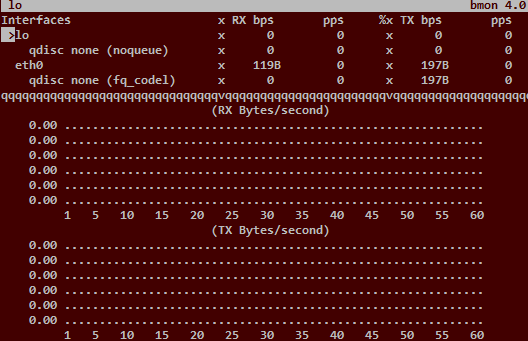
1. bmon : Linux 용 대역폭 및 트래픽 모니터링 도구
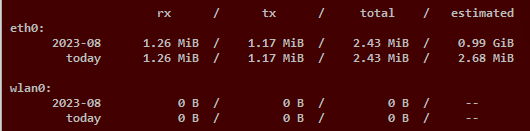
2. vnstat : 네트워크 트래픽 통계 도구
3. bind9 에러 로그 확인 ( /var/log/syslog )
'코딩' 카테고리의 다른 글
| 고정자원 관리 < python django (0) | 2023.09.11 |
|---|---|
| 한국의 행정구역과 파이썬 Map, Filter 그리고 정렬 (2) | 2023.08.22 |
| 이 웹사이트는 안전하지 않음! (0) | 2023.08.07 |
| 한글 처리(2), 파이썬으로 고급 코딩하기 (1) | 2023.08.05 |
| 한글 처리(1), 파이썬으로 기본 개념 잡기 (11) | 2023.07.31 |


