


브라우저를 켜, 이 사이트 저 사이트를 돌아다니다 보면 위와 같은 "주의 요함"을 경고가 나오는 사이트를 볼 수 있다. 웹서버와 브라우저 간 데이터를 주고 받을때 암호화를 하지 않고 보내면 위와 같은 경고를 받게 된다.
브라우저와 웹서버의 통신 구조는 `통장 비밀번호`와 같은 데이터를 중간에서 가로채기, 사칭 사이트를 만들어 방문하도록 유도하는(피싱) 등의 해킹이 발생할 수 있어, 이를 방지하기 위한 보안조치가 필요하며 이를 위해 `HTTP` 가 아닌 `HTTPS` 프로토콜을 사용한다.
HTTPS 는 Hyper Text Transfer Protocol 의 약자로, 보안된(암호화된) 인터넷 통신을 제공하는 프로토콜이다. 여기에, 웹사이트의 신원을 확인하는 인증서를 사용해 접속한 웹사이트가 신뢰할 수 있는지를 확인한다.
HTTPS 는 HTTP 프로토콜과 SSL (Secure Socket Layer) / TLS (Transport Layer Secure) 프로토콜을 조합해 작동한다
HTTPS 프로토콜을 사용하는 웹사이트 주소(URL)는 `https://' 로 시작하며, 주소 옆에는 잠겨진 자물쇠 아이콘이 표시된다.
* 참고. 현재는 TLS 로 발전되어 TLS 방식을 사용하나, 그냥 SSL 이라고 부른다
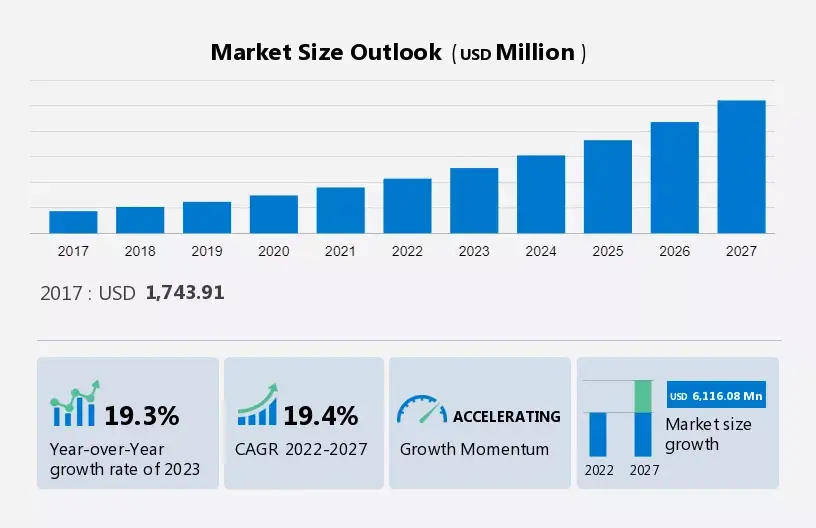
- SSL 인증 시장 규모 -

SSL 암호화 방식
HTTPS 에서 사용하는 SSL 암호화는 개인키(private key) 와 공개키(public key) 를 사용해 암호화하고 복호화하는 것이다. 암복호를 위해선 인증서(Certificate) 가 필요하다.
개인 암호화 키 생성
#! ubuntu v22.04

$ openssl genrsa -aes256 -out private.key 2048
Generating RSA private key, 2048 bit long modulus (2 primes)
...............................................+++++
............+++++
e is 65537 (0x010001)
Enter pass phrase for private.key:
Verifying - Enter pass phrase for private.key:
* `openssl` 은 여러 운영체제와 프로그래밍 언어에서 지원되며, 보안 프로토콜과 통신에서 널리 사용되는 암호 라이브러리다. 이 라이브러리는 암호화, 복호화, 디지털 서명, 인증서 생성 및 관리 등 다양한 암호학 기능을 제공한다.
* `genrsa` 는 RSA Private Key 를 생성하는 명령어다. RSA 는 대표적인 공개키 암호화 알고리즘으로 개발자인 Ron Rivest, Adi Shamir, Leonard Adleman 3명의 이름을 따 작명되었다.
인증서 생성 (Ubuntu 22.04)
개인키를 이용해 10년간 사용 가능한 인증서를 생성한다.
$ openssl req -x509 -new -nodes -key private.key -sha256 -days 3650 -out rootCA.pem
Enter pass phrase for private.key:
You are about to be asked to enter information that will be incorporated
into your certificate request.
What you are about to enter is what is called a Distinguished Name or a DN.
There are quite a few fields but you can leave some blank
For some fields there will be a default value,
If you enter '.', the field will be left blank.
-----
Country Name (2 letter code) [AU]:KR
State or Province Name (full name) [Some-State]:seoul
Locality Name (eg, city) []:
Organization Name (eg, company) [Internet Widgits Pty Ltd]:회사명
Organizational Unit Name (eg, section) []:부서명
Common Name (e.g. server FQDN or YOUR name) []:서버명
Email Address []:이메일주소
`.pem` : Privacy Enhanced Mail 의 약어로, PEM 파일에는 개인키와 인증서(x.509: 디지털 인증서 표준) 가 저장되어 있다.
개인 루트 인증서 생성 (SSC ; Self Signed Certificate)
모든 인증서는 서명해 줄 상위 인증기관 (발급기관 CA ; Certificate Authority) 이 필요하나, 개인키는 스스로 서명자(최상위 인증기관; root CA) 가 되야 한다. 이렇게 스스로 서명한 인증서를 Root CA 인증서, Self Signed Certificate 이라 한다.
#! Ubuntu 22.04

~/.ssl$ openssl x509 -outform der -in rootCA.pem -out rootCA.crt
* `crt` : Certificate (인증서) 의 약어로 `rootCA.crt` 는 루트 인증서를 말한다. 루트 인증서란 인증 기관이 서명한 최상위 인증서로, 웹브라우저에서 신뢰할 수 있는 인증서들의 체인을 형성하는데 사용한다.
윈도우즈(windows 11) 에 개인 루트 인증서 등록
유명한 인증기관(Root CA ; VeriSign, Comodo 등)의 인증서는 브라우저에 미리 탑재해 놓으나, 개인 루트 인증서는 수작업으로 추가해야 한다.
1. 윈도우즈 시스템으로 루트 인증서를 가져오기
ssl>scp -P xxxx `id`@`ip address`:/home/.ssl/rootCA.crt . # 맨 뒤에 점(period) 필수2. 가져온 파일(`rootCA.crt`) 을 두번 클릭해 `인증서 설치` 윈도우 팝


3. 인증서 설치를 누르고, 저장소 위치를 로컬 컴퓨터로 변경한 후 다음으로 이동

4. `모든 인증서를 다음 저장소에 저장` 을 선택 후, `찾아보기` 에서 `신뢰할 수 있는 루트 인증기관` 선택 후 다음 후 마

5. 확인
탐색기에서, `certmgr.msc` 기동 후, `신뢰할 수 있는 루트 인증기관` 의 `인증서` 폴더에 등록 확인
우분투 클라이언트 (ubuntu v22.04) 에 루트 인증서 등록
# 공용 디렉토리 생성 및 이동
$ sudo mkdir /usr/share/ca-certificates/extra
$ cd /usr/share/ca-certificates/extra

# 서버에서 생성한 루트 인증서 복사
$ sudo scp -P `포트번호` `id`@zrr9:/`directory`/rootCA.crt .  # 마지막 `점`으로 끝남

# 루트 인증서 등록
$ sudo dpkg-reconfigure ca-certificates

# Update CA Certificates
$ sudo update-ca-certificates

# Converting DER-form to PEM-form
$ sudo openssl x509 -inform pem -outform pem -in rootCA.pem -out thesysm_rootCA.crt
해당 URL 인증서 생성 (Ubuntu 22.04)
URL 인증서란 웹서버가 인증서를 발급받고자 할때, CSR을 생성해 인증기관(CA)에 제출한다.
# Create Key
$ openssl genrsa -aes256 -out the.sys.key 2048

# Delete the pass phrase
$ cp the.sys.key the.sys.key.enc
$ openssl rsa -in the.sys.key.enc -out the.sys.key

# Create Request
$ openssl req -new -key the.sys.key -out the.sys.csr
* `scr` : Certificate Signing Request 의 약자로 디지털 인증서를 발급받기 위해 사용되는 요청서이다.
해당 URL에 대한 추가적인 확장정보 생성 (.ext 파일)
vi the.sys.ext
###
authorityKeyIdentifier=keyid,issuer
basicConstraints=CA:FALSE
keyUsage = digitalSignature, nonRepudiation, keyEncipherment, dataEncipherment
subjectAltName = @alt_names

[alt_names]
DNS.1 = www.the.sys
DNS.2 = the.sys
DNS.3 = *.the.sys
###
해당 URL 에 대한 CRT 및 PEM key 생성
$ openssl x509 -req -in the.sys.csr -CA rootCA.pem -CAkey private.key -CAcreateserial -out the.sys.crt -days 3650 -sha256 -extfile the.sys.ext

$  openssl x509 -in the.sys.crt -outform PEM -out the.sys.pem
Nginx 웹서버에 적용하기 (ubuntu 22.04)
서버에 `the.sys.pem`, `the.sys.key` 파일을 복사해 사용한다.
#! nginx_addradm.conf

server {
    listen 443 ssl;
    server_name addradm.the.sys;

    ssl_certificate /home/cskang/.ssl/the.sys.pem;
    ssl_certificate_key /home/cskang/.ssl/the.sys.key;

    ## Send a URL to Django
    # proxy_set_header Host $host:$server_port;
    proxy_set_header Host $host;
    proxy_set_header X-Forwarded-For $proxy_add_x_forwarded_for;

    location / {
        proxy_pass http://unix:/home/cskang/ahading_data/addr_adm/.LOG/addr_adm.sock;
    }
    access_log /home/cskang/ahading_data/addr_adm/.LOG/nginx_access.log;
    error_log /home/cskang/ahading_data/addr_adm/.LOG/nginx_error.log;
}
작업 완료 및 결과 확인
"자물쇠가 잠겨있다."


3번 이상 본 영화 100선

영화 "아일랜드"는 2005년 개봉된 미국의 공상과학 액션 영화이다. 이완 맥그리거, 스칼렛 요한슨 주연, 마이클 베이 연출의 영화로, 해외 배급은 워너 브라더스, 북미 배급은 드림웍스가 맡았다.
2019년, 링컨 6-에코(이완 맥그리거)를 비롯한 사람들은 환경오염으로 바깥세상과 격리된 채 규칙적인 생활을 한다. 자기들이 환경오염으로 멸망한 인류의 마지막 생존자라 믿는 이들은 복권에 당첨되어 지상에 남아있다고 전해지는 환상의 섬 '아일랜드'로 가는 것이 유일한 꿈. 그러던 어느날 링컨 6-에코는 외부에서 들어온 벌레를 근거로 자신의 생활에 의문을 품고 격리시설 곳곳을 둘러본다. 그러던 와중 '아일랜드'로 갔다고 알려진 사람들이 잔혹하게 죽는 것을 보고 충격을 받아 '아일랜드'로 갈 예정의 미묘한 감정을 느끼던 조던 2-델타(스칼렛 요한슨)를 데리고 탈출하여 격리시설에서 설비 정비공(파이프 배관)으로 근무하던 맥코드(스티브 부세미)를 만나 그들은 복제인간이며, 언젠가 원래 몸의 주인이 병들거나 사고를 당하면 장기가 적출되기 위해 존재하는 것일뿐, 아일랜드에 간다는 것은 곧 죽음을 의미한다는 사실을 알게 되어 충격에 휩싸여 탈출한다. 그리고 그의 행동이 아일랜드를 운영하는 조직과의 전면전을 불러온다.
이 영화는 아일랜드의 진실과 음모, 그리고 인간의 존엄성에 대한 고민과 갈등이 영화를 통해 높은 긴장감과 스릴을 선사한다. "아일랜드"는 액션과 감동적인 이야기를 통해 관객들에게 깊은 인상을 남기며, 인간다움과 생존에 대한 영화속 깊은 메시지를 전달한다.
The movie "The Island" is a 2005 American science fiction action film directed by Michael Bay, starring Ewan McGregor and Scarlett Johansson. The film was distributed overseas by Warner Bros. and in North America by DreamWorks.
Set in 2019, the story revolves around Lincoln Six-Echo (played by Ewan McGregor) and other people living in a controlled environment, isolated from the outside world due to environmental contamination. Believing themselves to be the last survivors of humanity, they dream of winning the lottery to go to the supposed paradise called "The Island."
One day, Lincoln Six-Echo becomes curious about his surroundings after discovering a bug from the outside. While exploring the facility, he witnesses the brutal death of people who were claimed to have gone to "The Island." Shocked by this revelation, he decides to escape with Jordan Two-Delta (played by Scarlett Johansson), who had been planning to go to "The Island" with mixed feelings. They discover that they are clones, created solely for the purpose of organ harvesting should their original counterparts fall ill or meet with accidents. Going to "The Island" is nothing but a death sentence.
Their escape leads to a face-off with the organization running "The Island," where they are determined to fight for their freedom and dignity as human beings.
"The Island" presents a thrilling story of truth, conspiracy, and the struggle for human dignity. Through action and emotional storytelling, the film leaves a deep impression on the audience and conveys a profound message about humanity and survival.
'코딩' 카테고리의 다른 글
| 한국의 행정구역과 파이썬 Map, Filter 그리고 정렬 (2) | 2023.08.22 |
|---|---|
| 할 일 없을땐, 집에 DNS 나 구축해보자 (0) | 2023.08.08 |
| 한글 처리(2), 파이썬으로 고급 코딩하기 (1) | 2023.08.05 |
| 한글 처리(1), 파이썬으로 기본 개념 잡기 (11) | 2023.07.31 |
| 컴파일러와 프로파일러 (1) | 2023.07.25 |


